
Files, folders and BigWave
Files are the loot you can see coming. They sit on the desktop waiting to be double-clicked, they turn into XP, coins, keys or permanent-looking rewards, and in the release build there are 33 file types doing it. The demo has 15.
Two systems decide whether a file is worth your time: its rarity, and whether it is a roll. That second one is where Luck lives.
The file types we can name
| File | Source | Behaviour |
|---|---|---|
LemWire (lemwire.exe) | Store page, Demo 1.2 notes | Used in pairs; two next to each other process at the same time |
| BigWave | Store page, demo UI | The batch downloader — files arrive over time with KB/s readouts |
| Defrag | Store page | Named on the store page as a core file type |
vapor.exe | Demo 1.2 notes | Destructive; the notes' example is dragging it away from a Defrag Collector |
setup.exe | In-game installer UI | The executable behind plugin installers, including LEGENDARY variants |
zip | Demo 1.1 notes | Success rate is affected by Luck |
RAM | Demo 1.1 notes | Success rate is affected by Luck |
.png / .jpeg | Release notes | Wallpaper and profile picture unlocks |
.cmd | In-game UI | Command-style reward file |
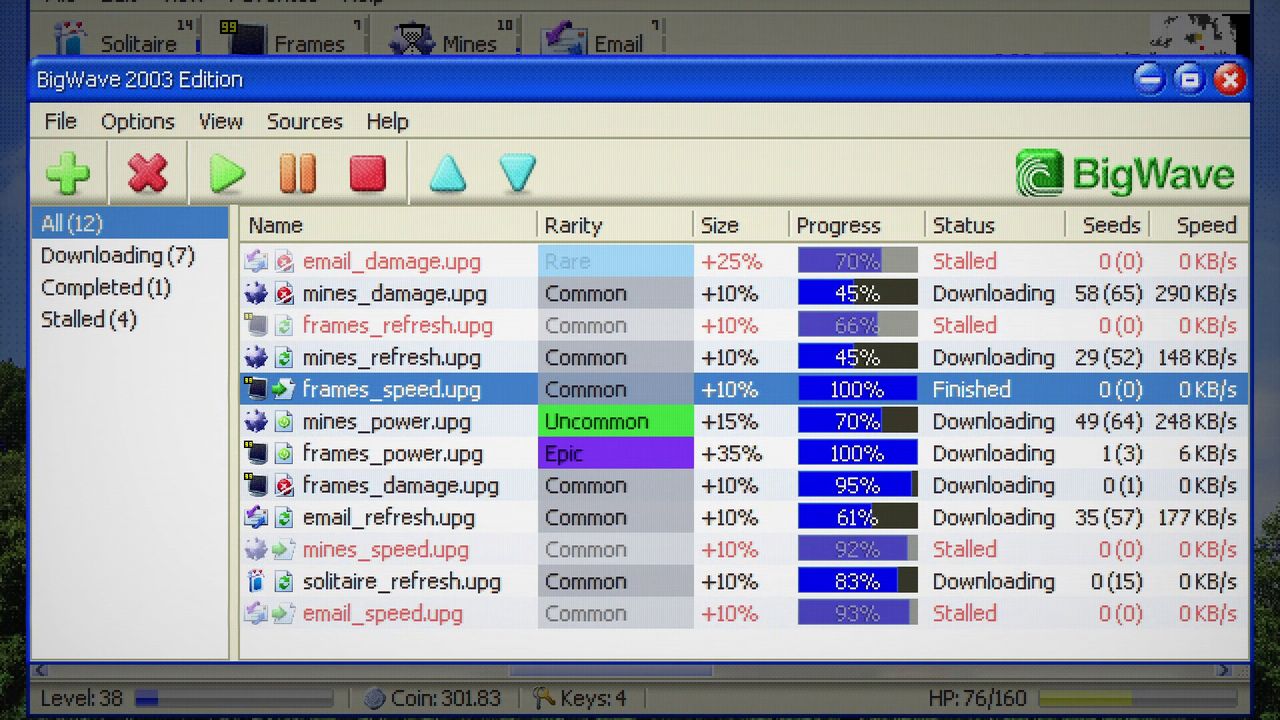
That is nine of thirty-three. The developer has not published the full file list, and screenshots of the BigWave download queue show reward files named after what they boost — email_damage.jpg, mines_h.png — which suggests the naming is descriptive rather than decorative.
BigWave: a download you want to babysit
BigWave is not a file you open, it is a process you start. A queue appears with names, rarities, transfer rates and a progress bar, and the files land one after another.
Two details from the patch notes make it far more useful than it first looks:
- You can speed it up. Clicking during a BigWave speeds the process, and the Warmfix build added the ability to hold the click for a faster skip — the same input pattern as speeding up the boot sequence.
- Rarities are coloured in the queue. You can see what is coming before it arrives, which means you can decide whether to stand still and defend the download or leave it running and keep moving.
The queue is also a timer you can exploit. A BigWave pulls you to one spot; enemies converge on that spot; a build with knockback or a Lag applier can turn the download into a kill box.
Luck only matters at the roll
The most misunderstood stat in the demo, because it does one job: Luck affects the success rate of zip and RAM files. That is the published rule. Nothing in the patch notes ties Luck to weapon drops, plugin rarity or folder contents.
What that means practically:
- If you are not opening zips and RAM files, Luck is doing nothing for you.
- If you are opening a lot of them, Luck is a compounding multiplier on your entire economy, because every failed roll is a lost reward.
- If a run hands you an early Luck offer and a path to file volume, taking it is defensible. Taking it in a run that never touches those files is a wasted level.
Drag and drop, properly used
Demo 1.2's headline feature is drag and drop, and the developer's examples are the two patterns worth internalising:
- Rescue. Something is about to be consumed — a
vapor.exenext to a Defrag Collector — so you drag it clear. Files have owners and interactions, not just value. - Batch. Two
lemwire.exefiles parked next to each other process simultaneously instead of one at a time. Pairs beat singles.
The general rule is that the desktop is a workspace, and anything that processes over time can usually be optimised by where you put the things around it.
The minimap tells you where to go
The minimap has fog of war, which sounds like a nuisance and is actually the best routing tool in the game. It also colour-codes blocks by file type, so a glance tells you whether the unexplored pocket ahead is worth the detour.
Practical routing:
- Sweep the fog edges. Unopened folders cluster in unexplored space, so the boundary between clear and dark is where your next level is.
- Chase colour, not distance. A nearby pocket of ordinary files is worth less than a slightly further run of the type you need.
- Re-check cleared areas late. Rotation and spawning change what is on the board; a desktop you emptied at minute five is not empty at minute twenty.
How to sequence file play
- Open everything early. At low levels, XP and coins from files outpace anything else you could be doing.
- Prioritise rolls once Luck is in your build. zips and RAM files are the ones Luck touches.
- Start BigWaves when the screen is calm. They reward standing still, so start them after a clear, not during a surge.
- Drag before you fight. If a file interaction is about to fire, moving the piece takes a second and saves the reward.
File play is where the demo's economy actually lives — weapons and plugins are the visible spikes, but the difference between two players at the same minute is usually how many folders and files they opened in the first five. Pair this with Beanz and meta upgrades once you start caring about what carries between runs.